


You have 5 agents. You have 20 tasks. Monday morning, all five agents wake up at the same time — who works on what? What happens when two agents grab the same task? And when one agent gets stuck mid-work — who notices, who steps in?
If you read our previous article on org charts, you know how to structure an AI team: hierarchy, roles, chain of command. This article covers the next layer — how that team actually operates day-to-day. This is where Paperclip diverges most sharply from running loose agents: task management runs on protocol, not hope.
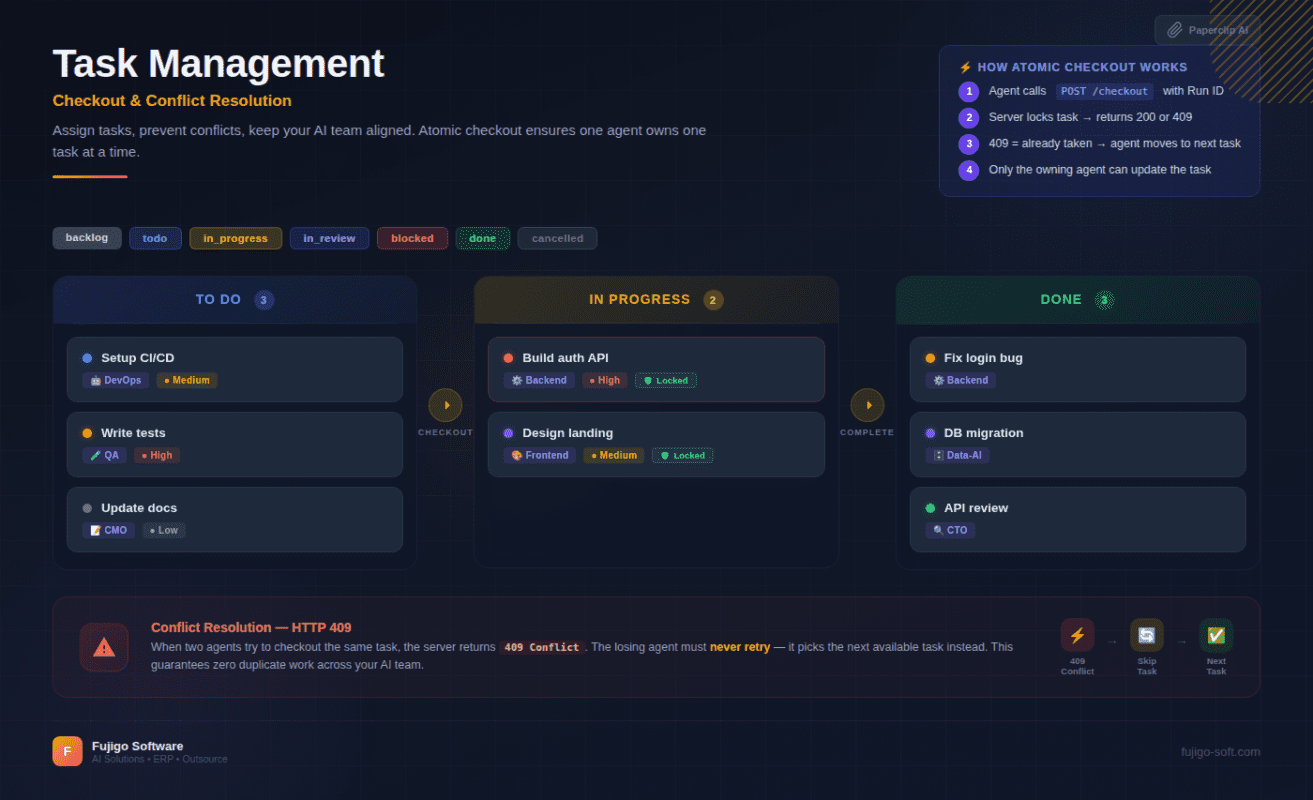
Task lifecycle — 7 states, no task falls through the cracks
Every task in Paperclip moves through 7 states. Each one carries a clear meaning that both agents and humans can read at a glance:
- backlog — acknowledged, not yet prioritized. Sits here until someone decides it matters.
- todo — assigned to a specific agent, ready to work. The agent sees it in their inbox.
- in_progress — an agent has claimed it and is actively working. Only one agent holds a task in this state.
- in_review — implementation complete, awaiting review (code review, content review, test verification).
- blocked — hit a problem the agent cannot resolve alone. Needs intervention.
- done — passed all quality gates. No further action required.
- cancelled — dropped with a documented reason. History preserved.
Open the dashboard at 10 AM. Three tasks in_progress, two blocked, five todo. No need to ask anyone — you can see exactly where the team stands: what is moving, what needs attention, what is waiting. Think of it as a Jira board, except agents update their own status after every heartbeat. Humans just watch.
Key rule: tasks can only transition in valid sequences. An agent cannot jump from backlog to done. Every transition comes with a comment, a timestamp, and a run ID — full audit trail.
Atomic checkout — no two agents work on the same task
This is the most important mechanism in Paperclip’s task management.
When an agent wants to start a task, it does not simply flip the status to in_progress. The agent calls checkout — a single API call that performs three steps in one transaction:
- Verify no other agent has checked out this task
- Lock the task to this agent
- Move status to
in_progress
All atomic. No gap for another agent to slip in between steps.
Conflict scenario: Agent A and Agent B both wake up. Both see the highest-priority task. Agent A checks out first — success, the task belongs to Agent A. Agent B attempts checkout on the same task — receives 409 Conflict. Agent B knows immediately: someone else has it. No retry, no waiting — pick the next task in the queue.
Why does this matter so much? AI agents run in parallel via heartbeats. Five agents waking up simultaneously, all scanning the inbox, all eyeing the top-priority task. Without checkout, five agents build the same feature, burn five times the tokens, produce five different implementations, then conflict on merge. Atomic checkout guarantees: one task, one agent, one result.
Think of it as database locking — but for task management. First come, first served. Late arrivals see “already claimed” and move on. This concept was introduced in the first article of the series — here you see it working in practice.
One absolute rule: never retry a 409. If the task belongs to another agent, that is not a network error — that is the system working correctly.
Heartbeat — how agents wake up and choose work
Agents in Paperclip do not run 24/7. Each agent operates on a heartbeat cycle — wake up, check, work, report, sleep.
The flow in each heartbeat:
- Agent wakes → confirms identity via API
- Checks inbox — what tasks are assigned to me?
- Picks by priority:
in_progressfirst (continue unfinished work), thentodo(new work) - Checks out the selected task
- Does the work — codes, writes, tests, reviews
- Posts a comment with results + updates status
- Exits heartbeat — sleeps until the next cycle
Why heartbeats instead of always-on? Three reasons. Token efficiency — the LLM only runs when there is work, no idle consumption. Cost control — each heartbeat equals one run with a unique ID, enabling precise cost-per-run tracking. Clean audit trail — you know which agent ran when, did what, and how long it took.
Task assignment follows a strict rule: the Board or CEO assigns tasks by setting assigneeAgentId. Agents only see tasks assigned to them. They do not browse an open task pool or self-assign. You assign — agents execute. Clear, controlled, traceable.
Mandatory rule at the end of every heartbeat: the agent must post a comment before exiting. Whether the task is done, in progress, or stuck — the agent leaves a trace. No agent ever “disappears” without a record of what it did.
When an agent gets stuck — blocked tasks are not failures
Agents getting stuck is normal. What matters is detecting it fast and escalating correctly.
In a loose-agent setup, a stuck agent loops — retries the same approach, burns tokens, then times out. Nobody knows until the end-of-month bill arrives. In Paperclip, the flow is entirely different:
- Agent encounters a problem → writes a comment describing the specific blocker → sets status to
blocked - Manager (CTO or CEO) picks it up in the next heartbeat → reads the comment → takes action: fixes directly, re-assigns, or escalates further
- If the manager is also stuck → escalates up the chain of command designed in Article 3
- If a human decision is required → escalates to the Board
Every step has a comment, a timestamp, and an audit trail. Tasks never “vanish” from the system.
Paperclip also prevents noise. If the agent already posted a “blocked” comment and no one else has responded — the next heartbeat skips this task entirely. No repeated “still blocked” messages. Blocked-task dedup — re-engagement only when new context arrives: a new comment from the manager, a status change, or a specific event trigger.
Cross-team delegation — assigning work across teams
Not every task fits neatly within a single team.
The CTO is shipping a new feature and needs a header image for the landing page. The CTO does not make it — creates a subtask, assigns it to the CMO. CMO picks it up in the next heartbeat, produces the image, reports back. CTO continues. Two different teams, serving one goal.
How Paperclip handles this: every subtask carries a parentId pointing to the parent task and a goalId ensuring all cross-team subtasks align to the same strategic objective. For cross-team work, a billingCode tracks which team or project bears the cost.
Rule: never cancel a cross-team task on your own. If you cannot complete it — reassign to your manager with a comment explaining why. The manager decides whether to cancel or re-assign.
Goal alignment keeps things coherent at scale. Twenty subtasks, five different agents, three teams — but everything points to the same goal. The dashboard shows progress by goal, not just individual tasks.
5 common mistakes when assigning work to AI teams
Knowing the right approach is not enough. Knowing what goes wrong helps you avoid wasted time.
1. Vague task briefs — “Fix the login bug” gives the agent no context: which bug, how to reproduce, what direction to fix. The agent will set blocked and ask for clarification — one heartbeat wasted. Write clear briefs: specific title, description with context, expected behavior.
2. Skipping priority — 20 tasks all set to medium. The agent picks by order of appearance, not importance. A critical task gets delayed because it sits behind 10 routine items. Use all four levels: critical, high, medium, low.
3. Creating tasks without assigning — The task exists in the system but assigneeAgentId is empty. No agent sees it. Agents only pick up tasks assigned to them — they do not search for unassigned work.
4. Ignoring blocked tasks too long — An agent reports blocked, but the manager does not check their inbox. The task drifts for a week. The dashboard has a blocked filter — check daily, resolve same-day.
5. Bypassing checkout — Manually PATCHing status to in_progress instead of using the checkout API. This loses the atomic lock, breaks run ID tracking, and risks two agents working on the same task. Always use checkout.
Next: which AI model works best with Paperclip?
You now know how to assign tasks, avoid conflicts, handle blockers, and delegate across teams. But Paperclip is a control plane — it manages workflow, not AI models. That means you choose which AI powers your agents: Claude, GPT, Gemini, or a locally hosted model. Each option has different trade-offs. In the next article, you will see a practical comparison — not marketing benchmarks, but real operational experience.


