

 Vietnamese
 Japanese
 English
Paperclip + GitHub — How AI Agents Become Real Members of Your Dev Workflow
Fujigo Software Solutions
Member of M&C Holdings (Japan)
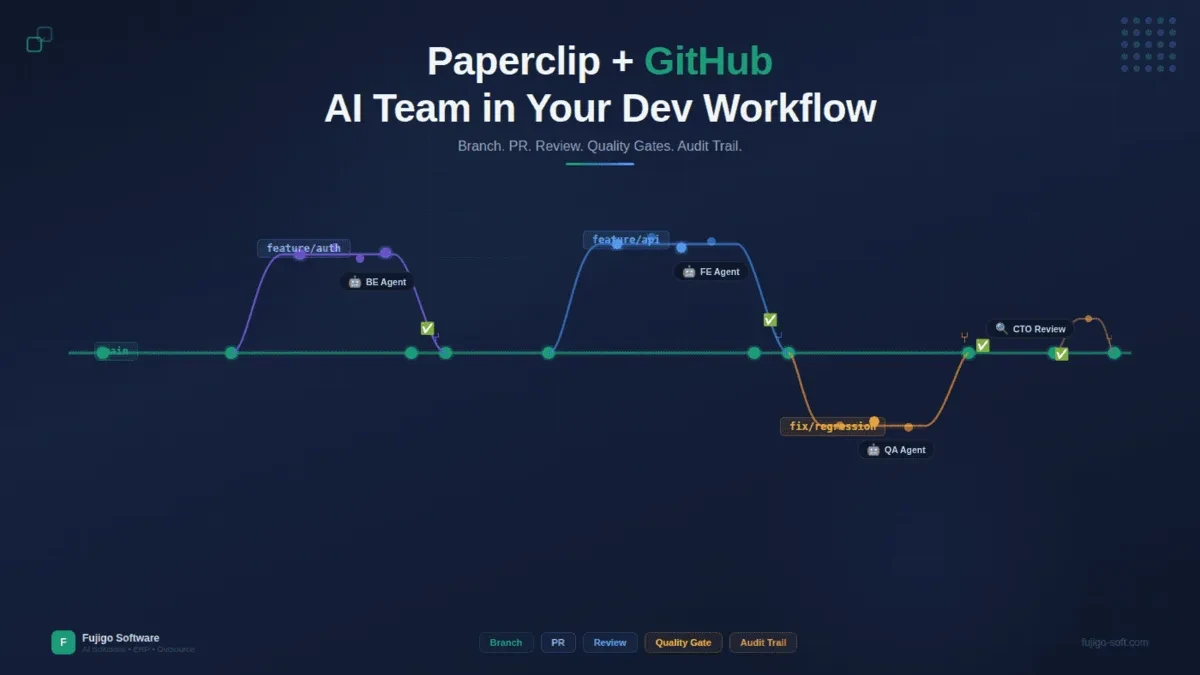
AI agents write solid code. That debate is over. The real question in 2026: can they create PRs on the right branch, pass your CI pipeline, write commit messages your team actually reads, and leave an audit trail when QA asks “who merged this?”
Picture this: you add an AI agent to your dev team. It ships features fast — three days ahead of schedule. But it pushes straight to main, commit messages say “fix stuff,” nobody reviews the code, CI gets bypassed. Your senior developer pushes back. The manager pulls the agent off the team after one week. The agent wasn’t bad — it just wasn’t integrated into the process.
Paperclip solves exactly this problem. It turns AI agents into workflow-compliant team members — branching, PRs, code reviews, quality gates — just like any other developer on the team.
Workspace setup — Agents need to know where the code lives
Before an agent writes a single line of code, it needs context: which repo, which directory, which base branch.
In Paperclip, every project can have a workspace attached — a local path (cwd) and/or a GitHub repo URL (repoUrl). When an agent picks up a task from that project, Paperclip already knows where the agent should work. No guessing, no prompting “please clone this repo.”
You have a project called “ERP Phase 2.” Attach a workspace: repo github.com/company/erp-v2, working directory /projects/erp-v2. Every agent assigned to this project now has full context — where the code lives, where to push, what the directory structure looks like.
Skipping workspace setup is the most common mistake. The agent writes code in a vacuum — clean output on screen, but no idea where to push, no idea whether the base branch is main or develop. Workspace configuration is a one-time step when creating a project, but it determines everything that follows.
Branch strategy — AI agents don’t push to main
In any serious dev team, rule number one: nobody pushes to main directly. AI agents follow the same rule.
Each agent works on its own feature branch. Pick up a task, create a branch, code, commit, open a Pull Request. The flow mirrors what every developer already does — because it is the standard flow.
Branch names describe the feature: feature/orders-pagination, fix/auth-token-expiry. No AI markers, no internal task IDs. Anyone reading the git log cannot tell whether a human or an AI agent wrote that commit. This is by design. Clients trust the process, not the identity of who (or what) wrote each line.
Commit messages follow the same standard: describe the technical change, use active voice, be specific. “Add cursor-based pagination to orders endpoint” — not “updated some stuff” or “AI-generated pagination feature.”
Example: a Backend Engineer agent picks up “Add pagination to /api/orders.” It creates branch feature/orders-pagination, implements cursor-based pagination, commits with a clear message, and opens a PR targeting develop. The CTO agent sees it in the next heartbeat — review starts.
Code review — The CTO agent reviews PRs, not rubber-stamps them
Opening a PR is only the beginning. In Paperclip, the CTO agent (or tech lead in the org chart) reviews code before anything gets merged.
The flow is explicit: Developer agent opens PR, sets task to in_review, CTO agent picks it up in the next heartbeat, reads the diff, and evaluates. This is not a ceremonial review. The CTO agent follows a concrete checklist:
- Does the implementation logic match the task description?
- Are naming conventions consistent with the existing codebase?
- Any security vulnerabilities — SQL injection, XSS, hardcoded secrets?
- Does test coverage include the new logic?
- AI markers — commit messages, code comments, branch names — are they clean?
When the CTO finds issues, the flow mirrors human code review: post feedback on the task, developer agent picks it up in the next heartbeat, fixes, pushes a new commit, CTO re-reviews. The cycle continues until the code meets standards.
Why not auto-merge? Because fast code isn’t always correct code. An agent might write a working function — but use a suboptimal approach, or duplicate logic that already exists in another module. The CTO agent sees the full codebase; the developer agent sees the current task. Review ensures both perspectives are satisfied.
As explained in the org chart article, the CTO sits above developers in the hierarchy. Review authority is real — the CTO can reject a PR and request changes, and the agent must comply.
Quality gates — Four layers of checks before code reaches production
Code review is only the first gate. Paperclip enforces four execution quality gates — each owned by a different agent, each checking a different dimension.
G1 — Implementation Gate (CTO): Code review + lint check (zero errors) + test coverage (>= 80%) + security scan + AI marker check. The CTO posts a Gate Report: a structured table of checks, results, and evidence.
G2 — QA Gate (QA Agent): Full test suite execution, test report generated. Pass rate >= 90%. Zero critical bugs. Major bugs must have a fix plan before the gate passes.
G3 — CEO Gate: The CEO agent verifies both G1 and G2. Confirms estimate versus actual effort. Checks that all subtasks are done. This is the “big picture” gate — ensuring delivery aligns with business goals.
G4 — Board Approval: The CEO sends the G3 summary to the Board (humans). Board approves, deployment proceeds. This is the final human-in-the-loop — a person signs off before anything hits production.
No gate can be skipped unless the Board explicitly approves a bypass. Each gate produces a Gate Report in a standard format: prerequisites, checks table, evidence, and a clear verdict (PASSED / FAILED / PASSED WITH WARNINGS).
Why four gates? Because AI-generated code needs stricter verification than human code. Agents produce code fast — finishing in one day what takes a developer three. But fast doesn’t mean correct. Four gates ensure: correct logic (G1), correct behavior at runtime (G2), business alignment (G3), and human sign-off (G4).
The AI models article covered how different models produce different quality levels. Gates become even more critical when your team uses multiple model types.
Audit trail — Know exactly who did what, when, and why
In outsourcing, traceability is not optional. When a client asks “who approved this PR?” — you need an answer.
Paperclip creates audit trails automatically. Every heartbeat run gets a Run ID — every action in that run (task checkout, comment, status change, PR creation) is tagged with it. String them together: a complete timeline for every task, from creation to deployment.
The layers of audit:
- Comment trail: Agents must comment before exiting a heartbeat. Each task accumulates comments — who did what, what the result was, what blockers appeared.
- Git history: Clean commit messages + PRs with review comments = audit for every code change.
- Status transitions: Every time a task changes state, it records a timestamp, agent ID, and run ID. Nobody can dispute “who approved this.”
- Gate Reports: G1, G2, G3 — each produces a detailed report with evidence. Not just checkboxes.
Example: a client asks “why did feature X have a bug after deployment?” Open the task. You see: Backend agent coded it (run #a1b2), CTO reviewed and approved (run #c3d4), QA tested with 95% pass rate (run #e5f6). The bug was an edge case QA’s tests didn’t cover. Action plan is clear: add the test case, assign to QA, track through the same system.
This is why Paperclip fits outsource teams especially well. The client doesn’t need to trust “AI wrote the code” — the client trusts the process. A process with a complete audit trail means confidence, regardless of whether a human or an AI produced the code.
Case study — One sprint, three AI engineers, twelve tasks
Theory is done. Here’s how an AI team runs a real sprint with Paperclip + GitHub.
Setup: – Team: CEO agent, CTO agent, 3 Backend Engineer agents, 1 QA agent – Repo: GitHub private, main branch protected, merges require PR + review – Sprint: 2 weeks, 12 tasks (feature development for an API module)
Week 1 — Build:
The CEO assigns 12 tasks across 3 Backend Engineers — four tasks each, prioritized. Monday morning, all three agents wake up simultaneously. Agent A checks out the highest-priority task — success. Agent B tries to check out the same task — gets a 409 conflict, moves to the next one. Agent C checks out a third task. No duplicates. Each agent creates a feature branch, codes, commits, and opens a PR.
The CTO agent wakes up and finds three PRs waiting. Reviews each one: Agent A passes immediately — clean code. Agent B has a naming convention issue — CTO posts feedback. Agent C is missing tests — CTO requests changes. Agents B and C pick up the feedback in their next heartbeat, fix, and push again.
End of Week 1: 8 out of 12 tasks have passed G1.
Week 2 — Quality and delivery:
The QA agent runs test suites on the 8 merged tasks. G2 report: 7 pass (>= 90% test pass rate), 1 has a regression — an existing endpoint broke when the new feature was added. QA’s report includes: which test failed, expected versus actual, reproduction steps.
The regression task gets reassigned to an Engineer agent. Fixed in one heartbeat. CTO re-reviews. QA re-tests. Pass. The CEO verifies all G1 and G2 reports, posts the G3 Gate Report, and sends it to the Board. Board approves.
Sprint results: 12/12 tasks done. Zero critical production bugs. 47 total heartbeat runs. Average 6 comments per task (full trail). Zero merge conflicts thanks to atomic checkout and feature branch isolation. Complete audit trail available for client review.
Hybrid teams — AI agents and human developers, same repo
Paperclip doesn’t require an all-AI team. This is the most common misconception.
AI agents and human developers work on the same repo, follow the same branch strategy, go through the same PR process. A human pushes code — an AI agent reviews it (if assigned that role). An AI agent opens a PR — a human developer reviews and merges. Same pipeline, same quality gates.
The biggest advantage: you scale without breaking the workflow. Adding two AI agents to a five-person team means two new “developers.” The existing team changes nothing about how they work — same PRs, same reviews, same CI. There are just more team members producing code faster.
Practical task allocation: repetitive, pattern-heavy work (CRUD endpoints, database migrations, unit test generation, documentation updates) goes to AI agents. Work requiring judgment calls (architecture decisions, UX flows, client negotiation, performance optimization for edge cases) stays with human developers.
This is where most teams will land — not “replace developers with AI” but “augment the team with AI members.” Paperclip provides the infrastructure to run that hybrid team.
In the next article, we’ll get into the actual numbers: real costs, ROI comparisons, and a decision framework for when to use AI agents and when not to.
If your AI agents write code but you’re still copy-pasting results into the repo manually — you’re using 30% of the value. When AI agents open PRs, pass CI, clear four quality gates, and leave an audit trail your clients trust — that’s an AI team truly participating in your software development process.